Sponsors

Showing posts with label Search Engine Optimization. Show all posts

Nook Tablet: Hands-On With Barnes & Noble's Alternative to the Kindle Fire 0

Amith | 8:03 PM | , , , , ,

B&N's Nook Tablet has beefier specs than Amazon's Kindle Fire, but it also has its share of limitations as a tablet.


The $250 Barnes & Noble Nook Tablet, available starting on November 16, will provide solid competition for Amazon's Kindle Fire. This is Barnes & Noble's second-generation device, a follow-on to last year's Nook Color, which now drops to $200, the same price as the Kindle Fire.

Now that I've had a chance to use the Nook Tablet, I've been able to identify some of its strengths, and a few of its weaknesses. Here are my initial impressions, particularly in comparison with the Kindle Fire. (This piece will be updated when we complete our full review.)


The Nook Tablet's main weakness--like the Kindle Fire's---is that it isn't a full-featured tablet. It lacks components such as built-in Bluetooth, stereo speakers, GPS, and front- and rear-facing cameras, most of which are common elements of tablets today. It also doesn't possess some common tablet capabilities, such as navigating primary tablet screens (for example, the home screen and content libraries) in landscape mode. Another omission: You can't view folders of images and movies in the included image gallery--all of the media thumbnails end up in one big bucket.
Still, the Nook Tablet's low price will make it appealing to fans of both e-readers and tablets. In fact, it's priced low enough to sway some consumers who might have been considering an iPad 2, which has a larger display, but also costs twice as much. Considering the Nook Tablet's competitive price and beefy specs, makers of other so-called "value" tablets (including Amazon, with its Kindle Fire tablet) may find that it poses a serious challenge.
And though the Nook Tablet doesn't excel as a tablet, it stays true to its roots as an LCD e-reader that is optimized for reading. That's one area where Amazon's Kindle Fire may have tripped up. The Nook Tablet's unique display has less reflectivity than the Kindle Fire's, and so is easier to read. In addition, some fonts and videos render more sharply on it than on the Fire.
Impressive Specs
The Nook Tablet's reading options; click for full-size image.Like the Amazon Kindle Fire, the Nook Tablet provides numerous reading options; but the Nook Tablet's screen is far superior.This tablet's beefed-up horsepower--in comparison to the earlier Nook Color e-reader's--really counts. The dual-core 1GHz Texas Instruments OMAP 4 CPU and 1GB of RAM made switching from app to app a breeze, with little lag or stuttering. Movies played smoothly and stutter-free in Netflix, and the high-definition images re-rendered for Nook's 1024-by-600-pixel display looked lovely, with terrific contrast.
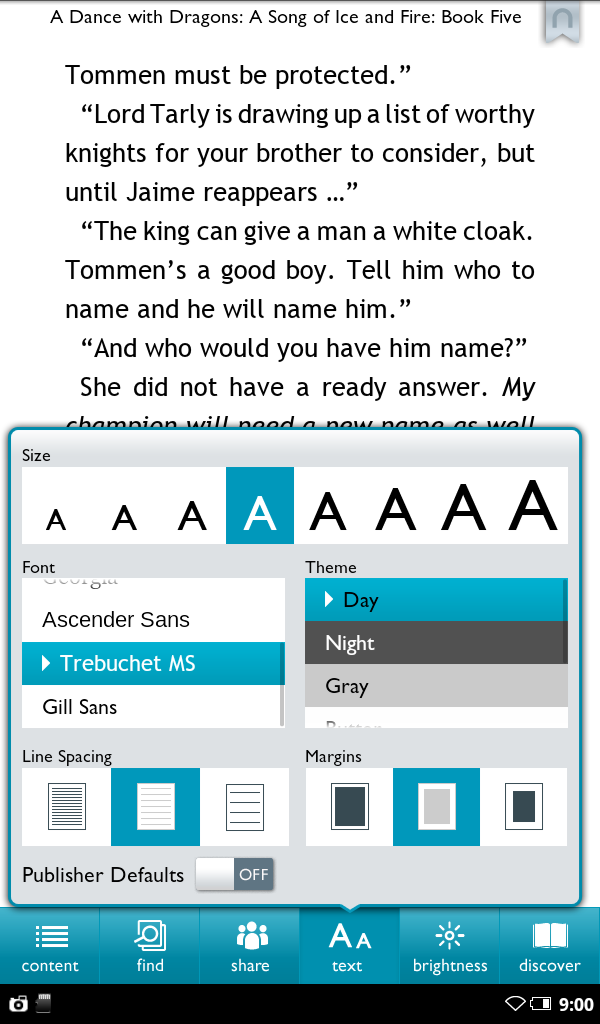
The Nook Tablet's display was dazzling overall. It's basically the same as the one on the Nook Color; but Barnes & Noble says that the new display incorporates some improvements from the company's display supplier.
Those improvements--and not software enhancements--account for the Nook Tablet's superior handling of whites and browns. In a test image, for example, skin tones and a brown sweater looked far more realistic on the Nook Tablet than on the Nook Color.
The screen's glare was minimal, thanks to what Barnes & Noble calls its VividView display. The IPS display is laminated and bonded; so unlike on other tablets's displays--including the Kindle Fire's--there's no annoying, visible air gap between the glass screen and the LCD beneath.
That's not to say that glare has completely disappeared on the Nook Tablet, but the difference is obvious in a side-by-side comparison. The VividView display also enhances the contrast and viewing angle of the Nook Tablet versus the Kindle Fire. The tablet felt noticeably lighter than the Nook Color, even though the difference on paper--1.7 ounces--seem negligible. Still, I could feel the difference when holding the tablet in one hand, as I often do when using one.
Side-by-side with the Kindle Fire, the weight difference is less evident. Only hundredths of a pound separate the two, and their balance feels quite different because of their different dimensions (the Nook Tablet is about 0.67 inch taller than the Kindle Fire).

Navigating the Nook Tablet

Nook Tablet home screen; click for full-size image.The Nook Tablet's home screen is highly customizable and provides quick access to apps and reading material.With the original Nook Color, Barnes & Noble's operating system--a variant initially built on the Android 2.2 OS--evolved in keeping with the Nook Tablet's alignment into the bigger tablet universe.
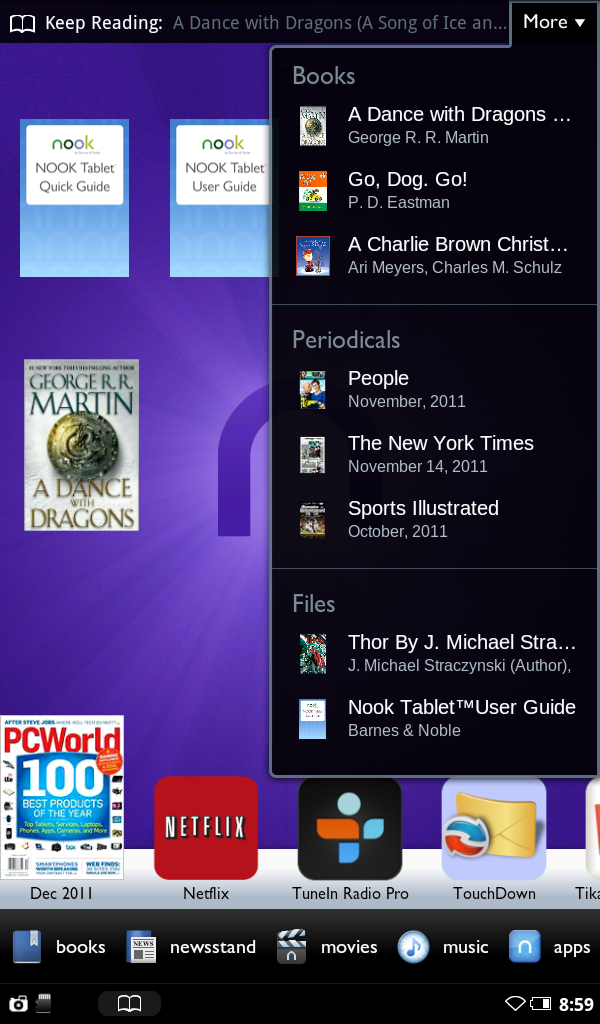
The Nook Tablet takes that integration to a higher level, but only for some apps. At launch, the flagship example is Netflix, whose tablet-optimized app and options are accessible from the Nook Tablet's home screen. You can access your Netflix viewing history and recommendations from the home screen and from the home screen's More menu--a convenient and logical move, given the Nook Tablet's aim to embrace its full tablet potential from the get-go, and given that Barnes & Noble lacks the direct digital storefront tie-ins that Amazon's Kindle Fire offers.
As a whole, apps are now treated in much the same way as book and periodical content. You can reach all of them through the recently accessed bar along the bottom of the home screen, and you can pin any of them to the home screen for easy one-tap access. I appreciated that this area didn't get cluttered with specific, recently played video or music selections--as happens on the Kindle Fire.
For all of its expansion to embrace apps and multimedia, the Nook Tablet continues to be optimized for reading, as is clear from the display, from how you access books, and from tablet's the visual presentation of periodicals.
The new Read and Record feature in children's books is especially compelling; it worked very well when I tried it. I could create my own audio track to accompany a book, a feature with special appeal for families with a loved one who travels or is far away. I hope we'll see the mic incorporated into other applications. Regrettably, video chat won't be one of those applications, since B&N didn't include a front-facing camera.


Where Are the Apps?

Apps are the lifeblood of any tablet--as can be seen from the thriving 100,000+ strong app ecosystem for the Apple iPad. Android tablets have struggled, though, in part because of the fragmentation caused by different Android OS versions and different screen sizes. Among competing, full-blown 7-inch tablets, the latest models from Acer, Samsung, Toshiba, and leading tablet makers use Google's Android 3.2 Honeycomb operating system, which was optimized for the larger screen sizes of tablets. Other models--particularly those produced by budget-conscious tablet makers--use some version of Android 2.2 or Android 2.3, neither of which was intended for use on tablets. In either case, finding apps that fit the tablet screen and look appropriate on a tablet has been an ongoing issue for Android tablets in general.
Nook Tablet Apps library; click for full-size image.The Nook Tablet Apps library is accessible from within a single library option that's divvied up into books, magazines, newspapers, apps, and more.Barnes & Noble based the Nook Tablet OS on Android 2.3, but the company doesn't include support for Android Market. Instead, apps are funneled through B&N's own, growing app store.
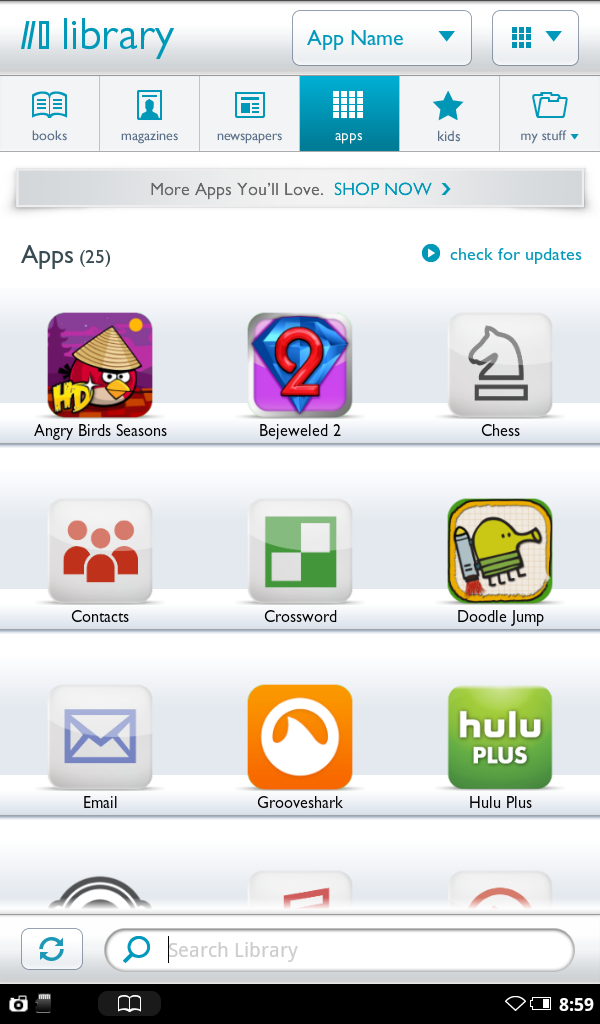
But there is some advantage to consumers in B&N's curated approach. In practice, the contrast to the messy Android Market experience was quite refreshing. I've downloaded plenty of apps from the Android Market onto 7-inch tablets only to have them crash and force-close on me--or not stretch properly to fit the tablet's screen. It was also a pleasant switch from what I saw in the Kindle Fire's Amazon Appstore.

What Barnes & Noble Missed

The Nook Tablet is missing such common tablet features as Bluetooth, stereo speakers, a GPS, and front- and rear-facing cameras. The Nook Color omitted those features as well, but considering that the Nook Tablet calls itself a tablet and is trying to compete with tablets, Barnes & Noble should have added at least some of them.
Admittedly, some of the "value" competition lacks Google services and cameras, too; but the Nook Tablet's core specs are good enough for it to play in the big kids' sandbox, alongside 7-inch Android Honeycomb tablets from the likes of Samsung and Toshiba.
The Nook Tablet would stand up better to the competition if it had added a more competitive feature set.
I would also like to have seen B&N step up the display's resolution. B&N's bonded and laminated VividView display qualities significantly improve the display's quality, but in some fonts, I could still see pixelation in the text.
I prefer the smooth text rendering of higher-resolution displays, such as those offered by Toshiba's 7” Thrive and T-Mobile's SpringBoard, two Android 3.2 Honeycomb tablets that have raised their display resolution to 1280 by 800 pixels. And even Samsung's Galaxy Tab 7.0 Plus--another Honeycomb tablet, but one that has the same resolution as the Nook Tablet--does a better job of text rendering than the Nook Tablet.
Though B&N clearly missed a few opportunities to forge ahead of the 7-inch tablet pack, these omissions were undoubtedly carefully calculated trade-offs necessitated by the need to achieve an attractive price. And attractive it is: At $250, the Nook Tablet is a bargain compared with theSamsung Galaxy Tab 7 Plus (shipping now) and the Thrive 7” (shipping in December), both priced at $399. It's also far cheaper than the SpringBoard ($440 across its two-year contract, plus monthly mobile broadband payments).
As for how the Nook Tablet tracks with the Kindle Fire, here's our first take: For reading, you're better off with the Nook Tablet. For everything else, check back soon to read our full evaluation of the Nook Tablet, and to see where it fits into the current tablet landscape.

Search Engine Optimization (SEO) 2

Amith | 11:10 AM | ,


SEO is an acronym for "search engine optimization" or "search engine optimizer." Deciding to hire an SEO is a big decision that can potentially improve your site and save time, but you can also risk damage to your site and reputation. Make sure to research the potential advantages as well as the damage that an irresponsible SEO can do to your site. Many SEOs and other agencies and consultants provide useful services for website owners, including:
  • Review of your site content or structure
  • Technical advice on website development: for example, hosting, redirects, error pages, use of JavaScript
  • Content development
  • Management of online business development campaigns
  • Keyword research
  • SEO training
  • Expertise in specific markets and geographies.
Keep in mind that the Google search results page includes organic search results and often paid advertisement (denoted by the heading "Sponsored Links") as well. Advertising with Google won't have any effect on your site's presence in our search results. Google never accepts money to include or rank sites in our search results, and it costs nothing to appear in our organic search results. Free resources such as Webmaster Tools, the official Webmaster Central blog, and our discussion forum can provide you with a great deal of information about how to optimize your site for organic search. Many of these free sources, as well as information on paid search, can be found on Google Webmaster Central.
Before beginning your search for an SEO, it's a great idea to become an educated consumer and get familiar with how search engines work. We recommend starting here:
If you're thinking about hiring an SEO, the earlier the better. A great time to hire is when you're considering a site redesign, or planning to launch a new site. That way, you and your SEO can ensure that your site is designed to be search engine-friendly from the bottom up. However, a good SEO can also help improve an existing site.
Some useful questions to ask an SEO include:
  • Can you show me examples of your previous work and share some success stories?
  • Do you follow the Google Webmaster Guidelines?
  • Do you offer any online marketing services or advice to complement your organic search business?
  • What kind of results do you expect to see, and in what timeframe? How do you measure your success?
  • What's your experience in my industry?
  • What's your experience in my country/city?
  • What's your experience developing international sites?
  • What are your most important SEO techniques?
  • How long have you been in business?
  • How can I expect to communicate with you? Will you share with me all the changes you make to my site, and provide detailed information about your recommendations and the reasoning behind them?
While SEOs can provide clients with valuable services, some unethical SEOs have given the industry a black eye through their overly aggressive marketing efforts and their attempts to manipulate search engine results in unfair ways. Practices that violate our guidelines may result in a negative adjustment of your site's presence in Google, or even the removal of your site from our index. Here are some things to consider:
  • Be wary of SEO firms and web consultants or agencies that send you email out of the blue.Amazingly, we get these spam emails too:
    "Dear google.com,
    I visited your website and noticed that you are not listed in most of the major search engines and directories..."
    Reserve the same skepticism for unsolicited email about search engines as you do for "burn fat at night" diet pills or requests to help transfer funds from deposed dictators.
  • No one can guarantee a #1 ranking on Google.Beware of SEOs that claim to guarantee rankings, allege a "special relationship" with Google, or advertise a "priority submit" to Google. There is no priority submit for Google. In fact, the only way to submit a site to Google directly is through our Add URL page or by submitting a Sitemap and you can do this yourself at no cost whatsoever.
  • Be careful if a company is secretive or won't clearly explain what they intend to do.Ask for explanations if something is unclear. If an SEO creates deceptive or misleading content on your behalf, such as doorway pages or "throwaway" domains, your site could be removed entirely from Google's index. Ultimately, you are responsible for the actions of any companies you hire, so it's best to be sure you know exactly how they intend to "help" you. If an SEO has FTP access to your server, they should be willing to explain all the changes they are making to your site.
  • You should never have to link to an SEO.Avoid SEOs that talk about the power of "free-for-all" links, link popularity schemes, or submitting your site to thousands of search engines. These are typically useless exercises that don't affect your ranking in the results of the major search engines -- at least, not in a way you would likely consider to be positive.
  • Choose wisely.While you consider whether to go with an SEO, you may want to do some research on the industry. Google is one way to do that, of course. You might also seek out a few of the cautionary tales that have appeared in the press, including this article on one particularly aggressive SEO: http://seattletimes.nwsource.com/html/businesstechnology/2002002970_nwbizbriefs12.html. While Google doesn't comment on specific companies, we've encountered firms calling themselves SEOs who follow practices that are clearly beyond the pale of accepted business behavior. Be careful.
  • Be sure to understand where the money goes.While Google never sells better ranking in our search results, several other search engines combine pay-per-click or pay-for-inclusion results with their regular web search results. Some SEOs will promise to rank you highly in search engines, but place you in the advertising section rather than in the search results. A few SEOs will even change their bid prices in real time to create the illusion that they "control" other search engines and can place themselves in the slot of their choice. This scam doesn't work with Google because our advertising is clearly labeled and separated from our search results, but be sure to ask any SEO you're considering which fees go toward permanent inclusion and which apply toward temporary advertising.
  • What are the most common abuses a website owner is likely to encounter?
  • One common scam is the creation of "shadow" domains that funnel users to a site by using deceptive redirects. These shadow domains often will be owned by the SEO who claims to be working on a client's behalf. However, if the relationship sours, the SEO may point the domain to a different site, or even to a competitor's domain. If that happens, the client has paid to develop a competing site owned entirely by the SEO. Another illicit practice is to place "doorway" pages loaded with keywords on the client's site somewhere. The SEO promises this will make the page more relevant for more queries. This is inherently false since individual pages are rarely relevant for a wide range of keywords. More insidious, however, is that these doorway pages often contain hidden links to the SEO's other clients as well. Such doorway pages drain away the link popularity of a site and route it to the SEO and its other clients, which may include sites with unsavory or illegal content.
  • What are some other things to look out for?
  • There are a few warning signs that you may be dealing with a rogue SEO. It's far from a comprehensive list, so if you have any doubts, you should trust your instincts. By all means, feel free to walk away if the SEO:
    • owns shadow domains
    • puts links to their other clients on doorway pages
    • offers to sell keywords in the address bar
    • doesn't distinguish between actual search results and ads that appear on search results pages
    • guarantees ranking, but only on obscure, long keyword phrases you would get anyway
    • operates with multiple aliases or falsified WHOIS info
    • gets traffic from "fake" search engines, spyware, or scumware
    • has had domains removed from Google's index or is not itself listed in Google
    If you feel that you were deceived by an SEO in some way, you may want to report it. In the United States, the Federal Trade Commission (FTC) handles complaints about deceptive or unfair business practices. To file a complaint, visit: http://www.ftc.gov/ and click on "File a Complaint Online," call 1-877-FTC-HELP, or write to:
    Federal Trade Commission CRC-240 Washington, D.C. 20580
    If your complaint is against a company in a country other than the United States, please file it at http://www.econsumer.gov/.


Related Posts Plugin for WordPress, Blogger...